
Simply Saying, JavaCard is a kind of SmartCard with JavaCard VM, which can run any JavaCard applet.The opening of Java Card specification makes JavaCard really easy to program instead of old-style Proprietary CPU Card that requires signing up for NDK. In that case, due to the cost of sharing their confidential documents, technical support and production, most of the Manufacturers will not even make a contract with you a little company!So that the JavaCard is the only way we can customize and program SmartCard as safe as CC EAL6+ at low cost.
Get a JavaCard
Actually, you can get JCOP4.5 P71 easily from AliExpress or Taobao, a typical J3R180 costs only about $3-$4 while the minimal order quantity is one. You can choose uninitlized (unprepersonalized), unfused or fused card(prepersonalized), even more, you can choose a already secured card(personalized).
Furthermore, a PC/SC compatiable card reader is necessary, it may be better to have USB CCID interface, a SCR3210 is good enough with costing only $4-$5. It is not recommended to use contactless card readers for card opening and program downloading. Insufficient power supply to the programming EEPROM and Flash memory can damage the card. Since most cards use the SCP02 protocol and 3DES keys, contactless card readers may pose potential security risks by may be listening by others. Furthermore, because JavaCard is the implementation for almost all bank cards and SIM cards, security requirements make these cards highly susceptible to self-locking (bricking) due to improper operation, therefore, please think carefully before entering any commands.
Wait, What is prepersonalization, prepersonalization or fusing?
Configure JavaCard
Prepersonalization and Fusing
Every card was unfused and uninitialized at factory, they will be programmed with a TransportKey (TK) by vendor, the TK protects the card from unauthorized access during logistics and transportation. When the card got by card issuer, the issuer unlocks the card with TK, then initialize the card with parameters such as ATR, SCP key to communicate with Issuer Security Domain (ISD) and so on. This process is called initialization or prepersonalized, in exact, it contains multiple Vendor-Specific APDUs, like following command sequence:
Warning: DON’T TRY THIS ON YOUR CARD, CONTACT YOUR VENDOR OR DISTROBUTOR FOR INITLIZATION SEQUENCE, OR IT MAY BRICK YOUR CARD.
1 | APDU: |
Personalization and GP Initlizate
After fusing, the card starts to work and can really response APDUs. The ISD, as known as Card Manager, is available to us now. Therefore, if you got a card without prepersonalization and fusing, you must get TK from your vendor; a card prepersonalized but unfused allows you to change underlying configurations of card, then a fused card don’t. After fused, the card’s TK becomes useless, therefore, to a certain extent, the TK does not need to be kept secret. In such a fused state, we can communicate with Card Manager, in most cards, it’s GlobalPlatform, there is a utility call GlobalPlatformPro to deal with it. such as:
1 | $ gp -i |
As you can see, the card manager is now responding correctly to our requests. At this point, you need to obtain the SCP key, whether it was written by the prepersonalization process or obtained from the reseller. Then you can perform query for applets installed and the state of the card manager.
Warning: DON’T TRY MULTIPLE TIMES OF WRONG KEY ON YOUR CARD, CONTACT YOUR VENDOR OR DISTROBUTOR FOR SCP KEY, OR IT MAY BRICK YOUR CARD.
1 | $ gp -lv -key-enc ******************************** -key-mac ******************************** -key-dek ******************************** |
If everything is working correctly (or you bought a fused card), you should get the OP_READY status. You can start personalizing now. If you bought a fused card change the 3DES SCP Key is necessary:
To use diversity-derived keys:
1 | $ gp -lock emv:<NEW 128bits KEY HEX> -key-enc <OLD SCP KEY HEX> -key-mac <OLD SCP KEY HEX> -key-dek <OLD SCP KEY HEX> |
To use 3 plaintext keys:
1 | $ gp -lock-enc <NEW 128bits KEY HEX> -lock-mac <NEW 128bits KEY HEX> -lock-dek <NEW 128bits KEY HEX> -key-enc <OLD SCP KEY HEX> -key-mac <OLD SCP KEY HEX> -key-dek <OLD SCP KEY HEX> |
After that, you can personlize the card. (In following command, the AAAA is ICPrePersonalizer the BBBB is ICPrePersonalizationEquipmentID, the ICPrePersonalizationEquipmentDate is set to today so remaning the 3rd and 4th bytes zero):
1 | $ gp -set-perso AAAA0000BBBBBBBB -today [SCP KEY PARAM (e.g. -key emv:xxxx or -key-enc xxxx -key-mac xxxx -key-dek xxxx)] |
Caution: Keep your SCP keys safe! If someone obtains your SCP keys, they can implant any applet into your smart card. This weakens card security and could even lead to forged and fraudulent card responses.
If you are certain that you no longer need to change the card manager settings, you can now initialize and secure the card.
1 | $ gp -initialize-card <SCP KEY PARAM> |
Query ISD again to confirm that:
1 | $ gp -lv <SCP KEY PARAM> |
Install Applets
Congratulations! The card is now fully initialized and ready to download applets. In fact, most applets can be installed into smart cards as long as the card’s version requirements are met (and there is sufficient NVMEM remaining) by following command:
1 | gp --install <CAPFILE> <SCP KEY PARAM> |
And remove by:
1 | gp --uninstall <CAPFILE> <SCP KEY PARAM> |
But for SmartPGP, You’d better add --create d276000124010304A1A0[SERIAL IN 8 HEX CHARS]0000 into the paramater list, so that it can have a unique serial number.
Here are some suggested applets:
- OpenPGP: https://github.com/github-af/SmartPGP
- PIV: https://github.com/arekinath/PivApplet
- FIDO2: https://github.com/BryanJacobs/FIDO2Applet
- NDEF: // https://github.com/non-bin/coolNDEFthing
What’s more
On a JavaCard, all static objects and objects created with new reside in the NVM, while only stack frames reside in SRAM. Furthermore, for a JavaCard Applet, execution begins at the start of an APDU and ends upon its return. Therefore, a poorly constructed program can eventually exhaust all NVM and completely halt the card’s responsiveness! Reinserting the card will not resolve the issue; the only solution is to uninstall and reinstall the program.
For most NXP JCOP cards, they are some utility APDUs.
Get Free Memory
1 | $ gp --apdu 80CAFF2100 <SCP KEY PARAM> |
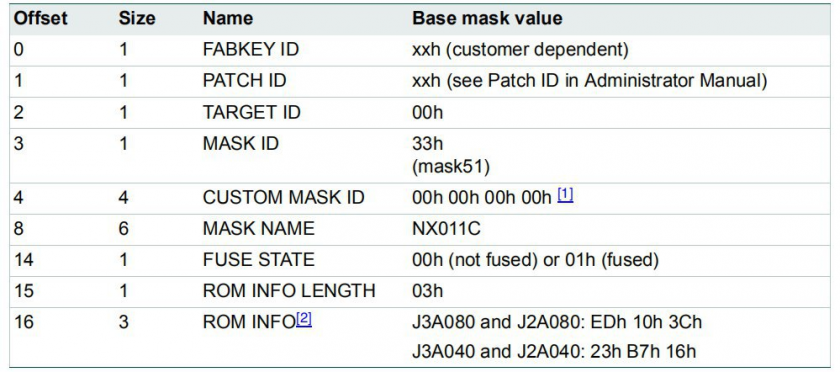
Get Card Details (JCOP3-)
1 | $ gp --apdu 00A4040009A000000167413000FF00 |
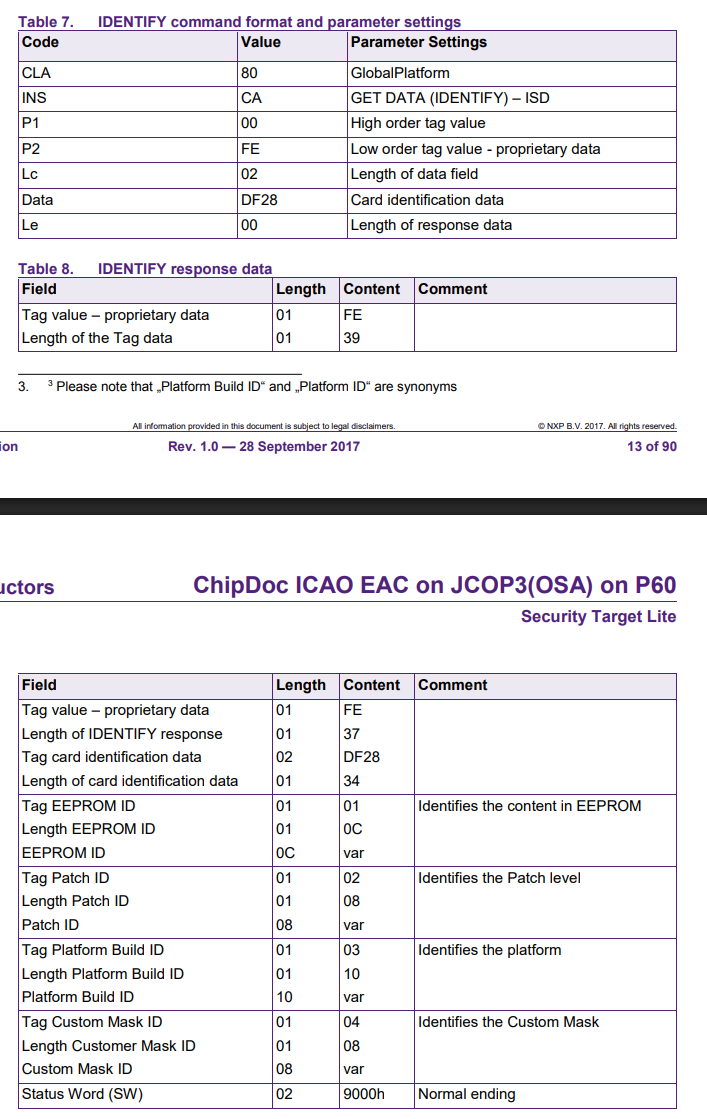
Get Card Details (JCOP4+)
1 | $ gp --apdu 80CA00FE02DF2800 |
qwq